Aftershock Festival
- 4.2
- Rating
- 10.00K
- Installs
- Free
- Price
 Analysis by App-foxy
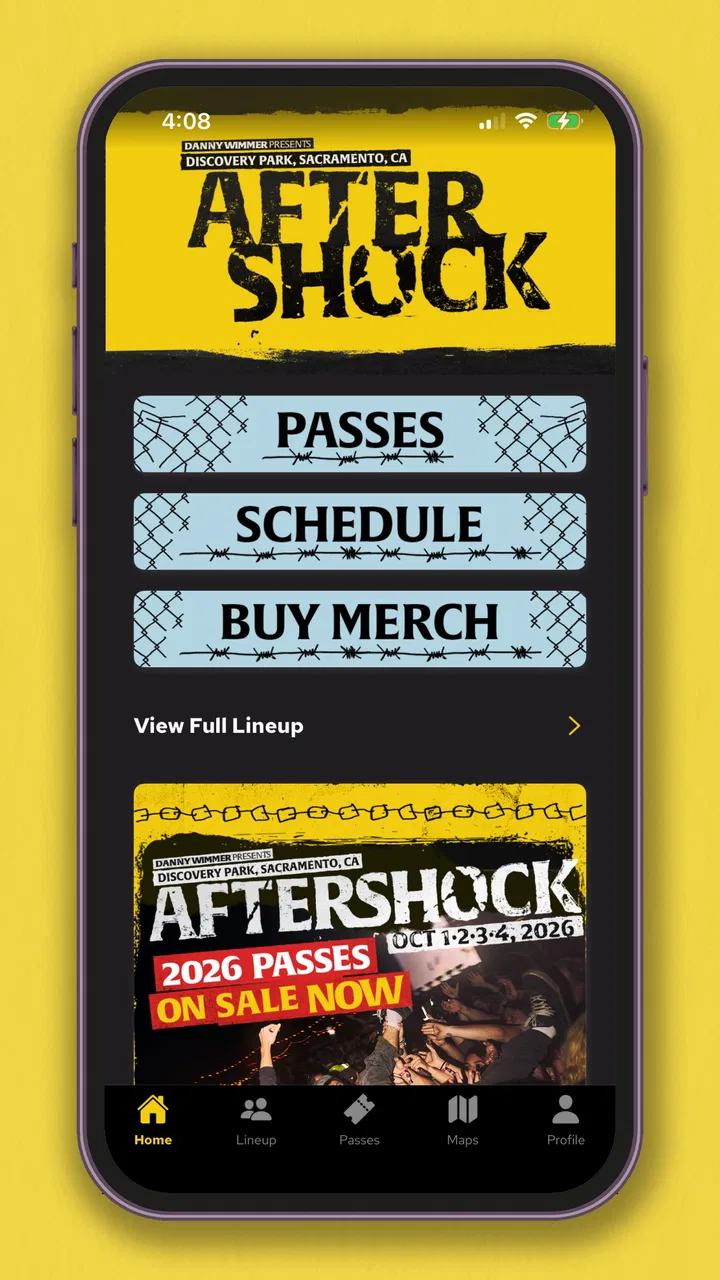
Going to Aftershock for the first time can feel exciting and slightly overwhelming at the same time. There are stages to think about, artists to choose between, a large crowd to navigate, and the usual question of where to look when plans change. The official festival app, Aftershock Festival, is designed to put that information in one place rather than leaving you to jump between searches, screenshots, and social posts.
I approached it as a practical event companion, not as an app I would open every day. That distinction matters. Its value is tied closely to the festival itself: before the event, it helps turn a broad lineup into a personal plan; during the event, it is most useful when I need to check what is happening next. It is a free Events app from Danny Wimmer Presents, available for users whose device runs at least OS 10, and it carries an Everyone content rating.
My overall impression is positive, especially for a first-time attendee who wants one official starting point. The app has an average rating of 4.2 from around 94 ratings, with roughly 34 written reviews, and it has passed 10K+ installs. Those figures suggest a modest but real audience rather than a universal planning tool. I would recommend trying it before building a festival itinerary, while keeping expectations realistic: it supports the event experience, but it does not replace personal preparation.
You May Also Like

 AccuWeather: Weather Radar
AccuWeather Review: A Quick, Clear Forecast for Everyday Decisions
For everyday plans, the best forecast is the one you can understand quickly. AccuWeather makes rain timing, radar, and local conditions easy to act on, with a few trade-offs.

 Hill Climb Racing
Why Hill Climb Racing Still Turns Crashes Into One More Run
A tiny car, a bumpy hill and one more upgrade: Hill Climb Racing keeps resurfacing because its simple chaos makes every near-miss feel personal.

 AliExpress - Shopping App
AliExpress Makes Global Shopping Feel Personal, but Shoppers Bear the Risk
AliExpress turns a global marketplace into a pocket-sized discovery engine. Its reach is useful, its shopping loop compelling, and its trade-offs easy to miss.

 Lords Mobile: Kingdom Wars
Lords Mobile Is a Kingdom-Building Routine, Not a Quick Match
A case-by-case verdict on the building, battles, device demands, and social commitments that make Lords Mobile rewarding for some players and exhausting for others.

 PDF Scanner app - TapScanner
TapScanner Makes Paperwork Easier to Capture, Check, and Share
TapScanner makes scanning with a phone feel less like a rescue operation and more like a dependable step in getting work done. Its capture tools are useful, though not flawless.

 Block Blast!
 Shows How Much a Puzzle Game Can Leave Out
A quiet grid game shows why puzzle players increasingly value instant clarity, repeatable skill and low-pressure play—and where the genre still needs to catch up.
More From Our News Desk
View All News


What to expect before you arrive
The first thing to understand is the app’s role. This is not a general music discovery service, a ticket marketplace, or a full replacement for every travel and communication tool on your phone. It is focused on Aftershock Music Festival, so its usefulness comes from having event-specific information close at hand. That focus is a strength because a dedicated festival app can be easier to scan than a general search page filled with unrelated results.
When I use an event app like this, I am looking for three kinds of help. First, I want to understand the shape of the day: which performances matter to me and when they happen. Second, I want a quick reference while I am already on site. Third, I want to reduce the number of decisions I have to make in a noisy, crowded environment. Aftershock Festival fits that workflow better than a generic music app because the information is connected to one specific event.
The most useful mindset is to treat the app as a planning surface. Do not wait until you are standing among thousands of people to explore everything for the first time. Install it while you still have time to look through the available event information, identify the performances you care about, and decide which choices are firm and which are flexible. That small amount of preparation makes the app more valuable once the day becomes busy.
I also like the fact that the app is free. There is no purchase decision standing between installation and trying it, which makes it reasonable to download even if you are still deciding how seriously to plan. For a casual attendee, it can serve as a quick reference. For someone attending with friends, it can become the shared basis for agreeing on where to be and when to meet.
There is an important trade-off here. A focused official app may be more relevant than a festival discussion thread, but it is not necessarily the best place for every kind of information. I would still use a maps app for the journey to the venue, a messaging app for coordinating with friends, and the phone’s normal notes or calendar tools for anything I personally need to remember. The festival app works best as the event-specific layer in that setup.
Who will get the most from it
It is a particularly good fit for first-time visitors, people attending multiple performances, and groups that need to compare plans. If you are the kind of person who arrives with a loose list of favorite artists and wants help turning it into a workable day, this is the audience I think the app serves best.
It may be less useful for someone attending only one performance and leaving immediately afterward. In that situation, a simple reminder and a route plan may be enough. I would also hesitate to rely on it as my only source of practical preparation if I needed detailed travel planning, personal accessibility arrangements, or a complete offline emergency reference. Those needs call for additional preparation rather than blind reliance on one event app.
Setting it up without overthinking it
The current version is 16.0.0, and the minimum operating-system requirement is OS 10. Before installing, I would check that the phone is updated enough to run it and that there is comfortable free storage. This is basic advice, but it prevents a frustrating first experience when someone is already on the way to the festival and discovers that the app cannot be installed or updated.
After opening it, I recommend taking a calm first pass instead of tapping through every section randomly. Look for the parts that help you understand the event schedule and the festival layout or practical information presented in the app. The goal is not to memorize the interface. The goal is to locate the screens you are most likely to revisit and make them familiar before the crowd and noise make small navigation problems feel larger.
A useful setup routine is to begin with your must-see performances. Pick the artists you would genuinely regret missing, then add the acts you would enjoy if the timing works. This creates a priority system that is more useful than a long, rigid list. Festival schedules often force choices, and an app can show you the options, but it cannot decide which experience matters most to you.
I would then make a second pass for practical movement. If two choices are close together, think about the time needed to leave one area and reach another rather than treating the schedule as if every transition were instant. Even without turning the app into a detailed travel planner, this habit helps prevent an itinerary that looks perfect on screen but becomes stressful in real life.
For a group, setup should happen together if possible. One person can open the schedule while another checks the event information, and then everyone can agree on a few fixed meeting points. This is one of the less obvious benefits of a dedicated event reference: it gives a group a common vocabulary. Instead of saying “the place near that stage,” you can discuss the same event information and make a clearer plan.
I would also avoid assuming that every detail you see once will be easy to recall later. Save or note the information that is personally important to you using whatever tools the app makes available and whatever normal phone tools you trust. A screenshot can be helpful for a key schedule view, but I would not build the entire day around screenshots because they can become outdated if event details change.
Your first meaningful action
The first successful action should be simple: use the app to create a realistic plan for one part of the festival day. Start with one performance you care about, identify what comes before it, and decide what you will do afterward. This is more valuable than browsing the lineup without making a decision because it turns the app from a catalog into a useful personal reference.
For example, imagine that I am attending with two friends and we each have different priorities. I would first agree on one performance we all want to share. Then I would mark separate choices around that anchor, leaving room for people to split up without making the whole day difficult to coordinate. We could choose a meeting point and a time to regroup, while keeping the app open as the common schedule reference.
This approach also helps with the emotional side of festival planning. A crowded lineup can create pressure to see everything, but no app can make overlapping performances disappear. By choosing a few anchors and accepting that some decisions are optional, I feel less tempted to spend the day rushing from one place to another. The app becomes a way to protect the experiences I value rather than a tool for maximizing the number of names checked off.
Once I have a basic plan, I would test the path from opening the app to finding that information again. That small rehearsal is an underrated tip. When the phone is in bright sunlight, the battery is low, and people are moving around me, I do not want to rediscover the interface. Knowing the route to the schedule or other essential event information is a practical advantage that a store summary cannot explain.
The best first result is not a perfect itinerary; it is a plan you can actually follow when the day becomes unpredictable. Leave space for food, rest, friends, and the simple possibility that you will enjoy an unplanned performance. A festival app should reduce friction, not turn entertainment into a timed examination.
Where new users can get confused
The most common confusion with a festival app is expecting it to answer questions that belong to other tools. It may help with event information, but I would not assume it can handle every detail of getting to the venue, arranging a ride home, contacting friends, or managing personal reminders. Separating those jobs early makes the app feel more reliable because I am asking it to do the work it is meant to do.
Another possible source of confusion is treating a displayed schedule as a guarantee that the day will unfold exactly as planned. Live events can involve changes, delays, crowd movement, or personal decisions to stay longer at a performance. I use the app as the current reference available to me, then keep a flexible attitude. The more tightly I schedule every minute, the more likely one change will disrupt the entire plan.
There is also a difference between information being available and information being convenient to use. A screen may contain what I need, but I still have to read it carefully and make sense of it in context. I recommend checking the full event view rather than relying only on the first item that catches my eye. For a first-time attendee, stage names, performance times, and movement between areas can blend together when viewed quickly.
Battery and connectivity are practical concerns for any phone-based festival plan. I would charge fully before leaving, carry a power bank if I have one, and avoid assuming that I can spend the entire day with the screen open. The app is helpful, but it should not become the only place where I keep essential personal information. I would retain important phone numbers, meeting details, and travel arrangements in a way I can access without repeatedly searching through the app.
Finally, remember that an official app is not the same as a personal concierge. It can organize event information, but it cannot know whether you are tired, whether your friends are lost, or whether a particular route feels comfortable in the moment. My best results come from combining the app with ordinary judgment. That is not a weakness unique to this product; it is the reality of using digital tools at a large live event.
How it compares with ordinary alternatives
The usual alternatives are a festival website in a mobile browser, social media posts, a paper schedule, screenshots, and general music apps. Each has a place, but they solve slightly different problems. A browser page can be useful when you are researching before installation, while social media may be better for informal updates and community discussion. A paper schedule is easy to glance at, but it cannot adapt as conveniently to a changing personal plan.
Compared with a general music app, Aftershock Festival has the advantage of context. A music service may be better for listening to unfamiliar artists, building a playlist, or discovering related performers. It is not necessarily designed to help me understand one festival day. I would use the music app for deciding who I want to see, then use the festival app for organizing those choices around the event.
Compared with screenshots, the dedicated app gives me a more active way to revisit information. Screenshots are fast and can be useful as a backup, but they become messy when I capture several versions or forget which one is current. I prefer using the app for exploration and keeping only a small number of personal notes or backup images for the details I know I will need most.
The main advantage over a generic web search is reduced distraction. Searching the open web can produce old pages, unrelated results, or information from different years. A focused festival app gives me a cleaner starting point. The trade-off is that it is less useful outside the Aftershock context, so I would not keep it installed for broad music planning after the event unless I had a reason to return to its information.
Making the second visit to the app count
After the first setup, I would return to the app with a narrower purpose rather than browsing aimlessly. Check the performances you selected, confirm that your plan still makes sense, and adjust the parts that were too ambitious. This is where the app becomes more than a one-time download: it supports an iterative plan that can change as your priorities become clearer.
A particularly useful workflow is to create three mental groups: essential, preferred, and spontaneous. The essential group protects the performances that define the day. The preferred group gives you options when timing and energy allow. The spontaneous group leaves room for discovery. The app supplies the event structure, while this three-level approach supplies the human flexibility that a schedule alone cannot provide.
If you are attending with children, older relatives, or anyone who needs a gentler pace, I would use the schedule to identify fewer anchors and longer breaks. The Everyone content rating makes the app broadly suitable from a content perspective, but suitability for a particular attendee also depends on the festival environment and that person’s comfort. The rating should not be mistaken for a complete judgment about the demands of a crowded live event.
For solo visitors, the app can be especially useful because it lets you plan around your own priorities without negotiating every choice. I would still tell someone I trust where I expect to be and when I plan to check in. The app can help me decide where I want to go, but it is not a substitute for sensible personal safety habits or a communication plan.
If you are mainly interested in discovering new music, I would pair this app with a listening service before the festival. Use the lineup or event information to identify unfamiliar names, listen elsewhere, and then return to the festival app to place those discoveries into your day. That two-step process is more effective than expecting the event app to provide the depth of a dedicated music-discovery platform.
My recommendation after using it
Aftershock Festival is a focused, free event companion that earns its place on my phone when I am preparing to attend the festival. It is made by Danny Wimmer Presents, carries an Everyone rating, and has been available since September 22, 2021. Those details matter less than the practical experience, but they place the app clearly: this is an official festival tool rather than a broad entertainment platform.
I would recommend it to a first-time attendee because it gives the planning process a clear home. Install it before the event, explore the schedule calmly, choose a few priorities, and rehearse how you will find them again. Then combine it with a travel app, messaging, personal notes, and a flexible attitude. That combination is much stronger than relying on any single source.
I would skip it if I were only looking for music discovery, a general concert calendar, or a complete travel planner. I would also avoid making it the sole backup for every important detail of the day. Its limitations are mostly about scope: it is useful because it is specific, and that same specificity means it cannot replace the other tools and decisions surrounding a festival visit.
Still, for the job it is meant to do, I find the app worthwhile. It helps turn a large event into a sequence of manageable choices, gives friends a shared reference point, and makes the first meaningful planning step less intimidating. If you are attending Aftershock, install it early and use it to build a flexible day rather than chase a flawless one.
FAQs for Aftershock Festival
01What is the Aftershock Festival app used for?
The Aftershock Festival app is designed to enhance the festival experience by providing users with essential information such as schedules, maps, and artist lineups. It also offers real-time updates, allowing attendees to stay informed about any changes or announcements during the event. This app ensures you have everything you need at your fingertips.
02Can I use the Aftershock Festival app without an internet connection?
While some features of the Aftershock Festival app can be accessed offline, such as downloaded schedules and maps, an internet connection is necessary for live updates and notifications. For the best experience, it is recommended to have data access during the festival to receive real-time information and updates.
03Is the Aftershock Festival app available for both Android and iOS devices?
Yes, the Aftershock Festival app is available for download on both Android and iOS devices. You can find it on the Google Play Store for Android users and the Apple App Store for iOS users. Ensure your device meets the app's compatibility requirements for optimal performance.
04Does the Aftershock Festival app have any social features?
The Aftershock Festival app includes social features that allow users to connect with friends and other festival-goers. You can share your schedule, post updates, and even find friends within the festival grounds using the app's interactive map. These features help create a more connected and engaging festival experience.
05Are there any costs or in-app purchases in the Aftershock Festival app?
The Aftershock Festival app is free to download and use. However, it does not include any in-app purchases. All features, including schedules, maps, and updates, are accessible without additional charges. This ensures all attendees can enjoy the full functionality of the app during the festival.
Pros
- Intuitive and user-friendly interface.
- Comprehensive lineup and schedule details.
- Real-time festival updates and alerts.
- Seamless ticket purchasing process.
- Customizable event reminders.
Cons
- Limited offline functionality.
- Occasional app crashes reported.
- High battery consumption.
- Requires constant internet connection.
- Limited integration with social media.

Aftershock Festival
Gallery